






How to Use Bochu Laser Cutting System Edge Finding Function
The Bochu laser cutting system (also known as FSCUT from Friendess or Shanghai Bochu Electronic Technology) is one of the most widely used control systems for fiber laser cutting machines in the sheet metal fabrication industry. It is a fully featured open-loop (and in higher models, bus-based) control system designed specifically for precision metal processing. A key feature that most operators rely on during sheet metal cutting is the edge finding (or “edge seeking”) function, particularly the capacitive edge finding method. This feature automatically detects the sheet’s edges, calculates any rotation angle if the material is placed skewed, and adjusts the workpiece coordinates accordingly—ensuring accurate cutting, reducing material waste, and improving efficiency.
In this comprehensive guide, we’ll walk you through how to set up and use the capacitive edge finding function in the Bochu FSCUT system (commonly paired with CypCut or HypCut software), including step-by-step instructions, preparation tips, operation details, common issues, and best practices. This will help you troubleshoot placement errors and achieve precise cuts every time.
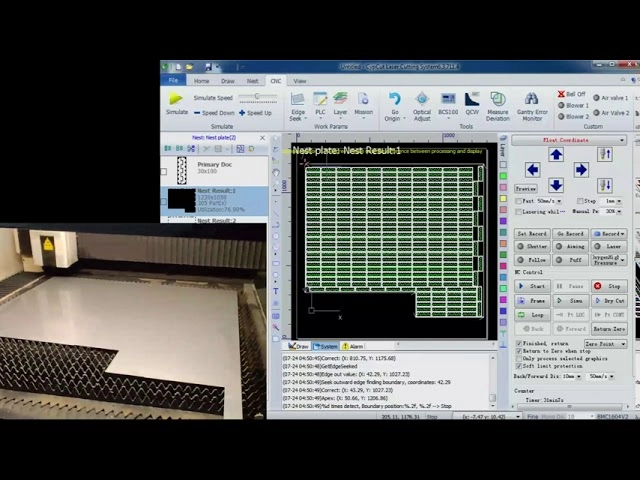
Required Tools and Materials
- Bochu FSCUT control system (e.g., FSCUT2000, 3000, 4000, 8000 series)
- Compatible software: CypCut or HypCut sheet metal processing control software
- Laser cutting machine with BCS100 (or similar) capacitive height controller
- Clean sheet metal material placed on the worktable
Note: The capacitive edge finding feature must be enabled in the machine configuration tool (platform config) under advanced settings > find edge parameters.
Preparation Before Edge Finding About Bochu Laser Cutting System
Before starting the edge finding process, proper preparation is essential for accurate results and safe operation:
1.Ensure the laser cutting machine is powered on and in normal working condition.
2.Clean the cutting head, nozzle, protective lens, and capacitive sensor ring to avoid contamination that could interfere with capacitance detection.
3.Place the sheet metal securely on the worktable. It doesn’t need to be perfectly aligned—edge finding compensates for skew—but ensure it’s flat and stable to prevent movement during detection.
4.Position the laser head inside the sheet boundaries (not over the edge or outside) at a safe height.
5.Calibrate the capacitive height controller (BCS100) if needed, via the software’s maintenance or config tools.
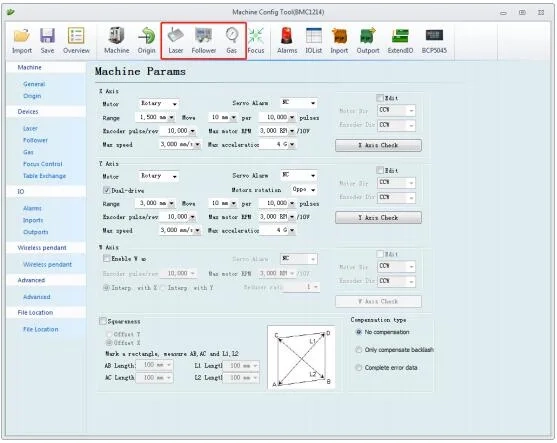
How to Set Up Capacitive Edge Finding Parameters of Bochu Laser Cutting System
How to Set Up Capacitive Edge Finding Parameters
The core settings for capacitive edge finding are configured in a dedicated dialog within the CypCut/HypCut software.
1.Access the Edge Finding Interface Open the CypCut or HypCut software. Navigate to the “CNC” or “Control” tab and click the “Edge Finding” button, or directly select “Capacitive Edge Finding.” This opens the parameter dialog.
2.View and Prepare Parameters The dialog displays key settings for capacitive edge finding. These ensure the system accurately detects edges using the BCS100 capacitive sensor.
3.Enter Sheet Dimensions Input the actual size of your material:
- Sheet Size X: Length along the machine’s X-axis.
- Sheet Size Y: Length along the machine’s Y-axis. Accurate dimensions help the system define the search range and avoid errors.
4.Set Margin Distance (Leave Edge Offset) This controls how the final workpiece origin is positioned relative to the detected edge:
- The system typically detects points slightly outside the sheet and corrects inward.
- Positive value: Shifts the origin further inward (recommended to avoid cutting too close to the edge, preventing vibration or instability).
- Negative value: Shifts outward.
- If you’ve already added margins in nesting software (e.g., CypNest), set this to 0. Common recommendation: 5-10mm positive for most applications.
5.Test and Save After filling the parameters, click “Three-Point Edge Finding Test” (or similar) on the right. The laser head will move to detect three points on the sheet edges.
- Monitor for smooth operation and accurate detection.
- If successful, click “Save” to apply settings.
Many Bochu systems support three-point or four-point edge finding for better rotation angle calculation on skewed sheets.
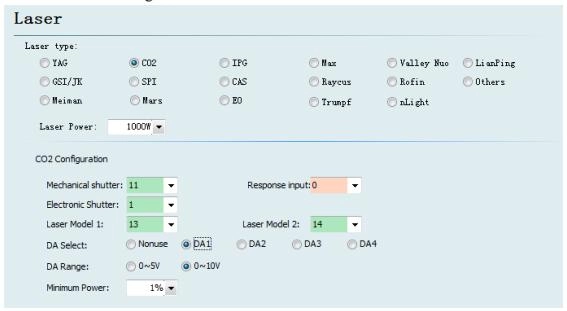
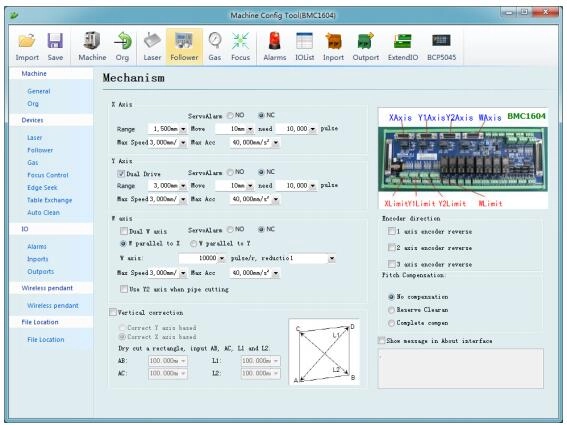
Performing the Edge Finding Operation of Bochu Laser Cutting System
Once parameters are set:
1.In the main control panel, select the edge finding option (it may appear if enabled in config).
2.Move the laser head to a starting position near (but inside) the expected sheet area.
3.Initiate capacitive edge finding—the head will automatically move to detect edges using capacitance changes.
4.The system calculates the sheet’s position, rotation angle, and adjusts coordinates.
5.Review the results on screen. If needed, manually fine-tune or re-run.
6.Proceed to load your cutting file—the adjusted coordinates ensure perfect alignment.
Common Issues and Troubleshooting of Bochu Laser Cutting System
- Detection Failure: Caused by dirty nozzle/sensor, uneven sheet, or incorrect starting position. Clean components and reposition head inside the sheet.
- Inaccurate Angle: Use three/four-point mode for skewed sheets; ensure sheet is larger than minimum detection range.
- Vibration or Alarm: Check for thin sheets (capacitive sensing works best on conductive metals); enable vibration suppression if available.
- Special Materials: Reflective (e.g., aluminum) or non-conductive sheets may require photoelectric edge finding alternative.
Precautions and Best Practices of Bochu Laser Cutting System
1.Always place sheets stably to avoid shifts during detection.
2.For reflective or transparent materials, consider switching to photoelectric sensing if equipped.
3.Monitor system feedback closely—stop immediately if anomalies occur.
4.Follow safety protocols: Wear protective gear, ensure no one is near moving parts.
5.Regularly calibrate the BCS100 controller for consistent capacitance readings.
In Conclusion
By mastering the capacitive edge finding function in your Bochu laser cutting system, you’ll significantly boost cutting precision, minimize waste, and enhance overall productivity in sheet metal processing. This feature is especially valuable for high-volume production where sheets are often placed imperfectly.
If issues persist, consult your machine supplier or Bochu’s official tutorials for model-specific variations.

V-Grooving Machine
- Press Brake
- Laser Cutting Machine
- Shearing Machine
- Press Brake Safety Precautions: Complete Guide for Safe Operation and Maintenance
- Hydraulic Press Machine
- Read more about Practical Methods for Press Brake Accuracy with Long Term Precision
- Rolling Machine
- Ironworker
- Press Brake Tooling
- Machinery Accessories